
First off, this post is not about saying you SHOULD delete records, but more about information for you as a user of Customer Insights – Journeys, or your environment administrator so you can understand what the records in the msdymkt_segmentexecution table are for. Also what happens if you DID delete them. I stumbled down this road because I had a lovely email from Microsoft saying I was over storage capacity. This table was the highest consumption for data, by a significant amount, so I started digging in. This post explains what it is used for and what happens if you delete the records.
First, this is why I was curious, notice the consumption amount for the records from this table. Yeah, what the heck? Why is it so large? If you want to find the total consumption per table, this link should take you to the newer capacity overview: https://admin.powerplatform.microsoft.com/billing/licenses/Dataverse/environmentview
From there it should prompt you to select an environment. Once selected, you should then be able to see usage per storage type at the top, then you can click on Database, Log or File. The consumption section below will then update based on the storage type you’ve selected.

After a bit of searching I came across the known issues documentation from Microsoft with this part on segments specifically. Notice that is even says the table can grow in size which can impact your storage usage and performance. It explains what it is used for, which is the graph and determining when a segment was updated. It also states that it is safe to delete them. Safe yes, but if your admin goes off and deletes everything, they may not be safe if the marketing manager realises!!! 😉

Deleting things will impact the chart you see that shows the growth of segment membership.

However, one could argue how much historical data you need here, and if you’ve been using the marketing app for any significant amount of time you could have millions (no exaggeration, one client I looked at has nearly 9 million of these records in the table). What I would suggest is a discussion between the marketing manager and a system administrator and determining how far back the history would be needed for the segment growth charts. Then create a bulk delete record that looks something like this.
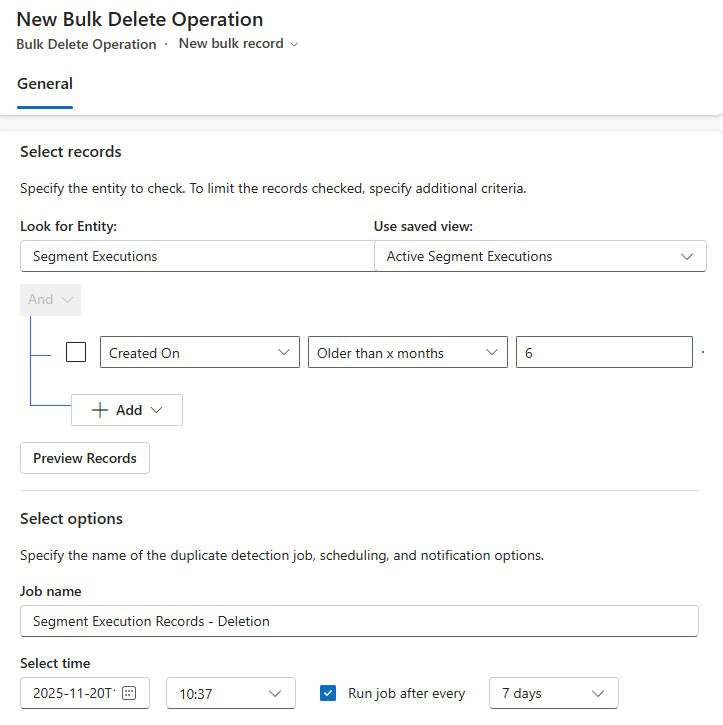
I ran it in my system for all of the data and it deleted over 2 million records.

But I won’t do that again because this is what I am left with. Doh! I have kept on my delete job that will delete records older than 6 months so I can keep some data but not ALL of the data.

Hope this helps!






Leave a Reply