
*** NOTE: ALL INFORMATION IS ACCURATE AT DATE OF PUBLISHING ***
Back in 2022 I wrote a post on how to manage accounts and contacts using Power Automate. Each time a new Contact is created the flow would use the email address to check and see if a related Account record already existed in Dataverse (D365) and link it directly to the record. If not, it would create a new Account using the domain from the Contacts email. I’ve used it in my own environment for years, but wondered if there was a better approach. This post will show how an option from data quality management experts and using Data8 can help with improving the quality of information you can get to add to your Account records.
First, this is not a paid promotion of any kind. Full disclosure, as a Microsoft MVP we are offered some credits by Data8 but I am not getting anything for writing this. I just think it’s something cool to share. They have a ton of brilliant solutions to help with data validation and cleansing including an automated deduplication tool that provides features to help make sure your data is as clean as possible. They also have several apps in Microsoft AppSource including Data8 Business Insights that helps you carry out real-time credit checks and access company information.
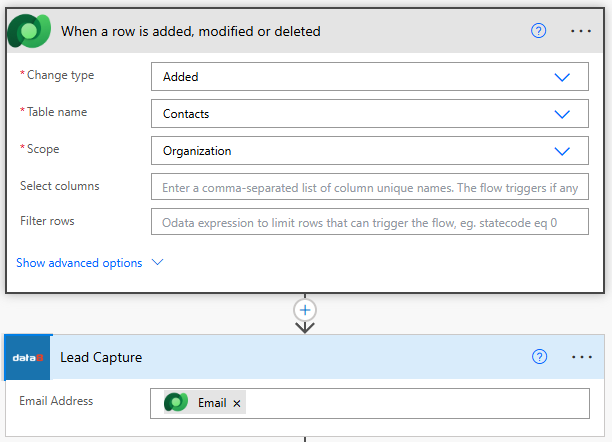
I wanted to see if there was way I could expand on my flow for managing my Contacts and Accounts and get the actual company name, address and other details. My flow just extracted the domain and only used that for the Account Name which wasn’t ideal. Disclaimer, the feature of Data8 that I found is UK centric although most of their other offerings are worldwide so make sure you check with them if you go down the route of using any of their solutions. Using a custom connector I was able to connect to the Data8 API and use the Lead Capture action step in my flow. All that I need to pass through is the Email address from the trigger when a Contact is created. Simple.
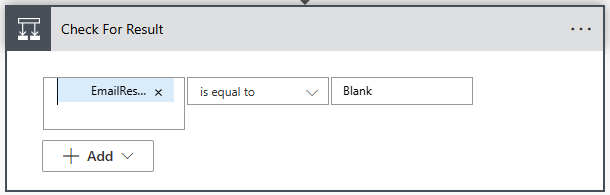
Next we need to see if there is a result sent back from Data8, meaning it was able to find a Company based on the email address. Things like Gmail, Yahoo etc will always send a blank, but if it is a UK based company there will be a value other than Blank in the Email Result from the Lead Capture action step. If it is Blank, I will then go off down the path of my original flow and use that logic to extract the domain and look for an existing Account that way.
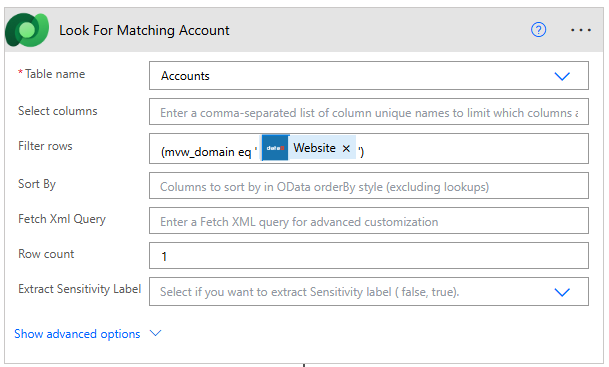
If it’s not Blank, this is where we can see the good stuff and create or update Accounts with some great information. We can add a List rows step to look for Accounts. In my environment I have a domain field on the Account so I can filter to find Accounts where the Website value passed back from Data8 matches the value in the Domain field on an Account.
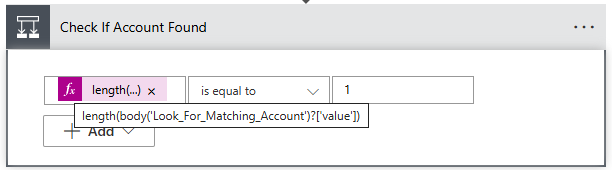
Then we can use a Condition step to check if the number of Accounts found is 1. Notice above I set the row count to 1. This really depends on how clean your data is but I know I don’t have duplicate Accounts in my system. So if there isn’t 1 that means no Account exists.
In that case, I can add a new Account record. You can also considering updating that existing Account if needed which could help add extra information and value to the record. That’s up to you to decide if you think that would be valuable. There is a TON of information that comes back from Data8. I didn’t use it all but see below for a list of what I am adding.
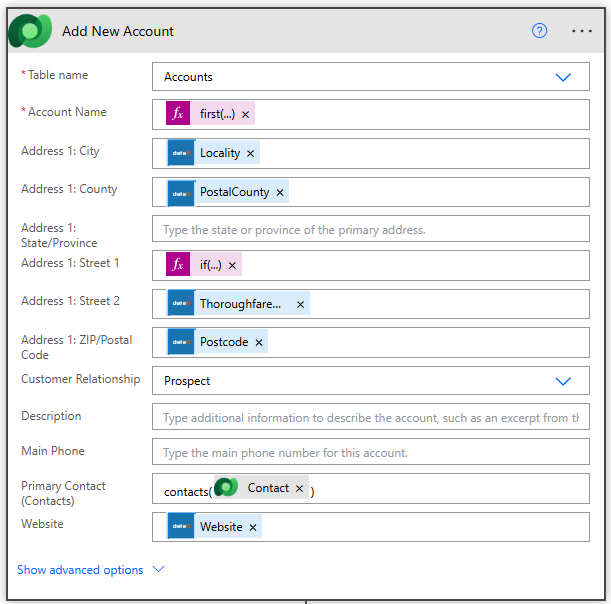
- Account Name – for this I am using a formula which takes the following information from the Address Lines value. first(outputs(‘Lead_Capture’)?[‘body/CompanyInformation/BaseInformation/Address/Address/Lines’])
- Address 1: City – Locality
- Address 1: County – PostalCounty
- Address 1: Street 1 – I am using the following formula to build up the first line of the address based on SubBuildingName and BuildingName depending on what information is present
if(
  and(
    not(empty(outputs('Lead_Capture')?['body/CompanyInformation/BaseInformation/Address/RawAddress/SubBuildingName'])),
    not(empty(outputs('Lead_Capture')?['body/CompanyInformation/BaseInformation/Address/RawAddress/BuildingName']))
  ),
  concat(
    outputs('Lead_Capture')?['body/CompanyInformation/BaseInformation/Address/RawAddress/SubBuildingName'],
    ', ',
    outputs('Lead_Capture')?['body/CompanyInformation/BaseInformation/Address/RawAddress/BuildingName']
  ),
  coalesce(
    outputs('Lead_Capture')?['body/CompanyInformation/BaseInformation/Address/RawAddress/SubBuildingName'],
    outputs('Lead_Capture')?['body/CompanyInformation/BaseInformation/Address/RawAddress/BuildingName'],
    ''
  )
)
- Address 1: Street 2 – ThoroughfareName
- Address 1: ZIP/Postal Code – Postcode
- Address 1: Country/Region – CountryISO2
- Address 1: Street 3 – DependentLocality
- Company Description – SicDescription
- Company Type – CompanyType
- Domain – Website
- Number of Employees – Employees
- Primary Contact – I am setting the Primary Contact field with the new contact that was created: contacts(@{triggerOutputs()?[‘body/contactid’]})
- Website – Website
Finally, I am using an Update row step and updating the Contact record and linking it back to the new Account. Use the formula below in the Company Name (Accounts) field for the Contact.

accounts(@{outputs('Add_New_Account')?['body/accountid']})
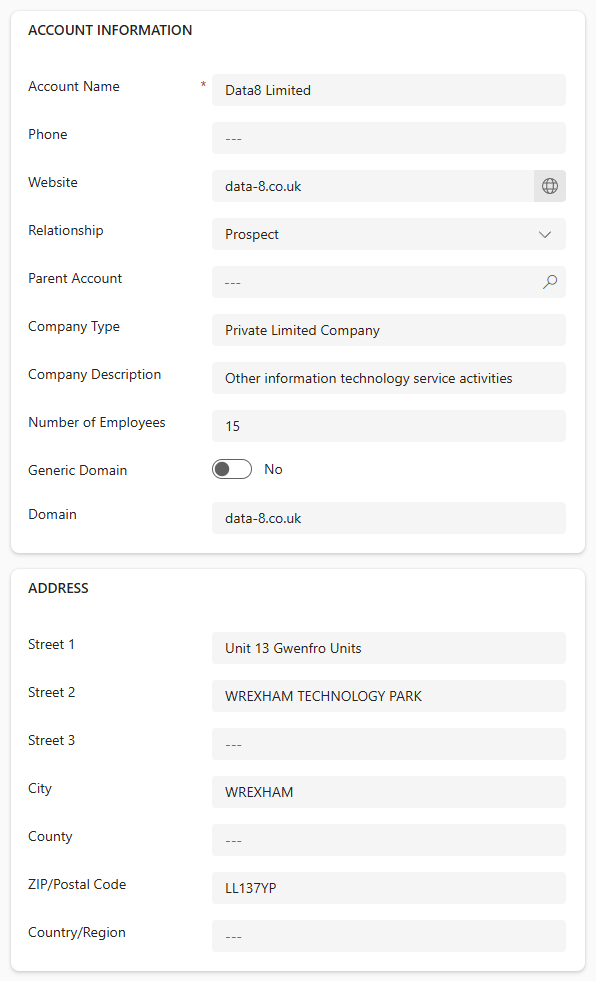
That’s it! I now have full address, website, company type, company description, and number of employees when a new Contact is created in my system. Love it.
Check out the latest post:
Open D365 Records From Your Custom Page Using Environment Variables
This is just 1 of 578 articles. You can browse through all of them by going to the main blog page, or navigate through different categories to find more content you are interested in. You can also subscribe and get new blog posts emailed to you directly.
Nice post, I previously used Data 8 components which worked very well.
They also created some custom data de-duplication routines which were bespoke and worked very well to deal with thousands of company records from legacy systems being bought into CRM. A very clever bunch of people.
Hi Scott, yes, they are very clever people! So many different offerings too.