
*** NOTE: ALL INFORMATION IS ACCURATE AT DATE OF PUBLISHING ***
If you send emails to Leads or Contacts with a Gmail or Yahoo account, I really hope you are aware of one-click unsubscribe. This was implemented in 2024 and made a requirement by Google that all commercial and promotional emails include the ability for someone to unsubscribe with just one click. This isn’t the same thing as having an unsubscribe link at the bottom of your marketing emails (that takes someone to the preference centre), but instead is specific functionality within the gmail client. In case you are wondering how this experience looks from your subscribers perspective, read on to find out.
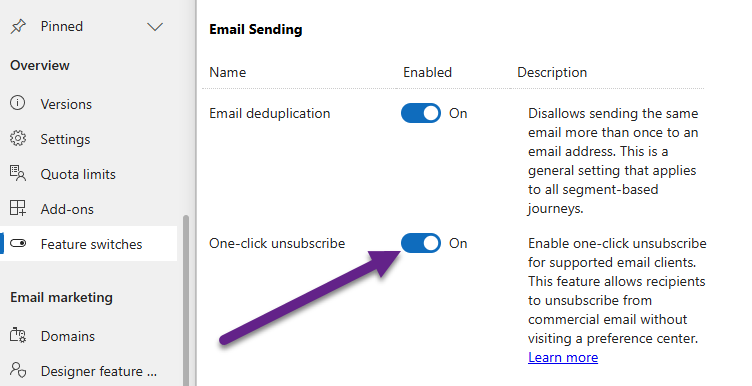
First, even if you aren’t sure if you don’t send mass daily emails to Gmail or Yahoo accounts, I would suggest turning on this Feature switch to follow best practice. Also, who knows, the rules could change in the future so just make sure you are compliant now.
Next, your Unsubscribe link is required in Commercial emails so don’t think you can or should stop adding this. This is the link through to the related Compliance Profile and opens up the Preference Centre for the person that clicks on it from a received email.

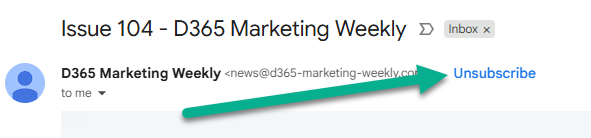
Instead, this is what the one-click unsubscribe refers to. If you have your own Gmail account you have likely seen this for anything you have subscribed to. It’s visible on mobile or desktop for emails you have received that are set up for one-click unsubscribe. Note that there is nothing more you need to do other than turn on the feature switch. All code required in the header (not something we have access to) of your outgoing emails will have the correct information added for you.
After the person clicks the Unsubscribe button, they can then click the big blue Unsubscribe button to confirm it. There is also a Learn more link that provides information on how to manage all of their subscriptions from organisations (not just yours).
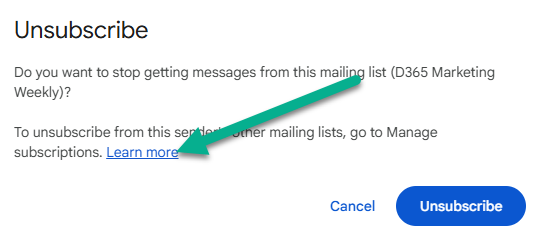
That Learn more link details that you can click on Manage subscriptions as you see here which then opens up a dashboard with all newsletters or emails subscribed to. Clicking Unsubscribe from here achieves the same thing as clicking the big blue button above.

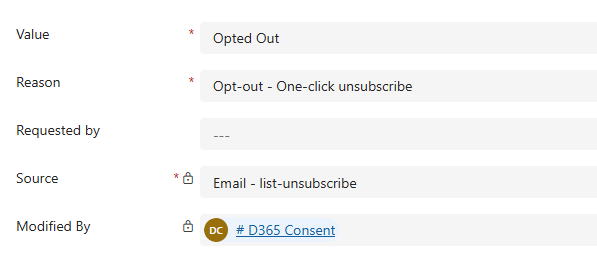
From your perspective in Customer Insights – Journeys, the related Contact Point Consent record for the email address will be updated automatically to Opted Out, with the Reason of ‘Opt-out – One-click unsubscribe’ and the Source of Email – list-unsubscribe.
From the documentation page from Microsoft:
- If the email only has a commercial purpose selected, then once the recipient selects the one-click unsubscribe link in their email client, the app marks them as opted-out for the specific purpose. This ensures that any future emails for the same purpose aren’t sent to that user.
- If the email is being sent for a specific topic, then once the recipient selects the one-click unsubscribe link in their email client, the app marks them as opted-out for the specific topic only. This ensures that any future emails for the same topic aren’t sent to that user.
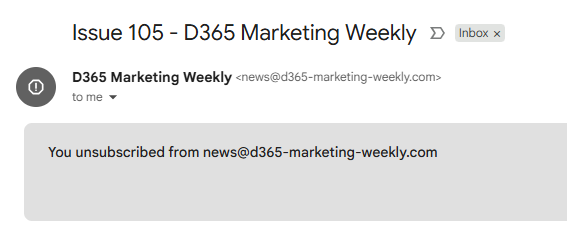
For the subscriber, if they open the email again, they will see a notification that they unsubscribed from emails from that email address.
Check out the latest post:
Add Activities To A Record Timeline Using Custom Pages
This is just 1 of 577 articles. You can browse through all of them by going to the main blog page, or navigate through different categories to find more content you are interested in. You can also subscribe and get new blog posts emailed to you directly.
Hi Megan,
Is there a way to customize the standard unsubscribe or Preference Centre in Microsoft Dynamics Customer Insights – Journeys to include a question asking contacts why they’re unsubscribing? For example, could we present them with a few options such as: “Too many emails,” “No longer interested,” etc.?
Hi Aakriti, unfortunately not. It’s definitely something I think we need! You can’t add any fields to the preference centre form. Only possible option would be to have some Javascript on the form that if the Unsubscribe from the Purpose option is used, that would redirect them to another form asking them why. Not ideal but the only way I can see that you would be able to achieve what you are looking for.
Interesting, I hadn’t thought of that. So to be aligned and clear for the customer, if you are using topics, each topic needs its own email address.
Otherwise:
1. they opt out of topic 1
2. you email them, from the same sender address, regarding topic 2,
3. they will think that the unsubscribe hasn’t happened.
Hi Angela, I wouldn’t suggest you need a different email address for each topic, no. If someone clicks the link to update their preferences, they should see (assuming you have them on the form) all of the topics and which ones they are opted in and opted out of. It shouldn’t be a surprise to the person.
Hi Megan,
Thanks for the post. I’m working on a client request to add a one-click unsubscribe link next to the preference center in the email footer. Some recipients don’t use Gmail/Yahoo, so they want the link visible in the email body for all emails, irrespective of email client.
I couldn’t find a tag or dynamic URL parameter for one-click unsubscribe —do you know if it can be added manually?
Thanks!
Hi Pankaj, one-click unsubscribe is a Gmail/Yahoo feature. It exists on the email they get in their inbox for that email client. You aren’t adding one-click unsubscribe to your email in D365 marketing. The unsubscribe link is what you are adding to the emails, and when they click that, they can pick what to opt in and out of.