
*** NOTE: ALL INFORMATION IS ACCURATE AT DATE OF PUBLISHING ***
This post has come out of my own frustration that I forget to change the end year and update copyright information at the bottom of emails. Typically a company will have the copyright symbol, their founding or ‘start year’ along with the current year then something like ‘All Rights Reserved’. You set the current year in January and sit back for 12 months. But will you remember to change it at the end of the year? This post shows how you can dynamically set the current year to use in your email footers.
Current Year is a field that might best fit on your Brand Profile table. Or you might have a custom table you want to add it to. You’ll want to add a formula field that takes the year from today and formats it in to text. If you do it as a number field, it will end up with a comma in it which isn’t ideal. This will make it a formula of the text string type.
Text(Year(UTCToday()), "0")

If you add it the the Brand profile form, you’ll be able to see it working. Notice that it’s locked because this field is set by a formula rather than anyone typing in to it.

Now that we have the field, we need to add it to a Content Block along with all other footer information we want to show. Add in personalisation and go through to the Brand profile section. You should be able to access the new Current Year field. One thing to keep in mind is if you add the field, it might take a few moments to show up as available to select on your template or content block, so just be patient if you don’t see it right away.
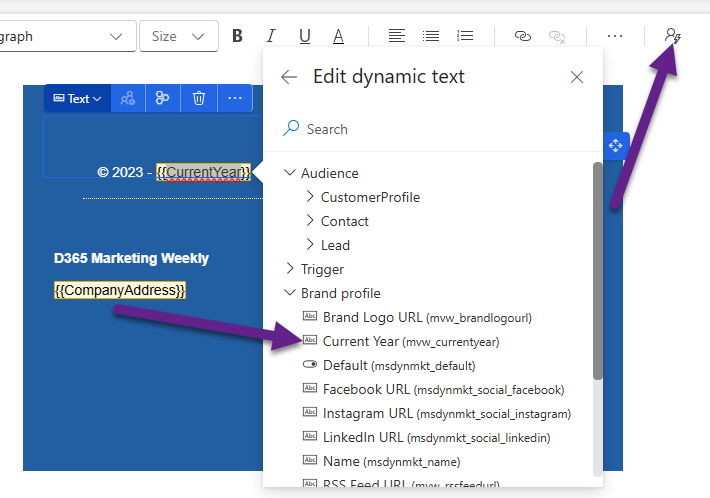
Once you’ve linked it, it should look like this. Go ahead and save it.
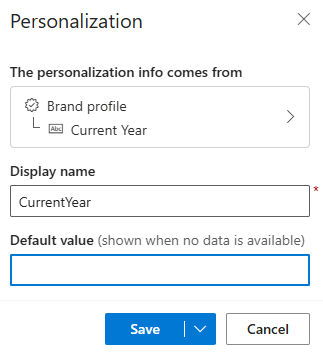
On your emails using the content block, make sure the Brand profile is selected. This will then be sure to pull in the Current Year from that record. Of course, this field will have the same value for each Brand profile as it’s formatted with the formula.

When the email goes out, it will end up pulling in the current year so it’s accurate and up to date. Roll on 2026 when this will be updated automatically! 🎉💙🎉

Check out the latest post:
Add Activities To A Record Timeline Using Custom Pages
This is just 1 of 577 articles. You can browse through all of them by going to the main blog page, or navigate through different categories to find more content you are interested in. You can also subscribe and get new blog posts emailed to you directly.
Hi Megan,
this looks useful, thank you. I am worried that this might be working only for new emails being created. I have experience, that current emails (even if they get edited) aren’t loading (updating) data from Brand profile, unless you select another brand profile and return back.
So if you have some older emails (e.g. as part of some automatization), unfortunately they are not getting refreshed with new values.
Do you have any solution for this?
Regards, Ivo
Hi Ivo – check out this post from Pauline Kolde – https://paulinekolde.info/sync-brand-profile-and-sender/ – she addresses this issue. It’s not ideal but it’s what we have to work with at the moment.