
One of the much needed features from Wave 1 2023 for marketing was the ability to set a cap on the number of messages someone could be sent. Limiting the number of messages with frequency capping was made generally available in the April 2023 release, which means it’s ready to go and to start being used in Production environments. How do you use it? It’s pretty straight forward, but take a look to make sure you know what to expect, then go and set your caps! Let’s take a look.
First, navigate to the Settings area in the D365 Marketing app, then go to the Customer engagement section. Click on Frequency cap.

Get started by clicking on Add new setting.

Give the record a name. If you only have one business unit, or only one of your business units are using the marketing app, the name doesn’t really matter too much. However, if you have multiple business units, and therefore want to add multiple frequency cap records, take that in to consideration and add to the name of the record. You have the option to set the maximum number of messages you can send a customer for Email, Texts and Push Notifications. These are commercial messages only as transactional will still be able to be sent out and would ignore the caps you have set. Consider the type of messages you send out to set an appropriate number that could be sent daily, weekly and monthly.

Once you have added the record, you can save and close it. If you need to have additional frequency cap records for other business units, you can still add them, but the owner must be changed to someone in the other business unit for it to link accordingly.

When creating a new Journey, you can click on the settings (gear icon) on the right panel and see what frequency caps will apply. The frequency cap record used will be based on the business unit of the owner of the Journey. If there is a need to make sure this message gets through to your customers and ignore the frequency caps set, there is an option to select not to apply them to the journey.

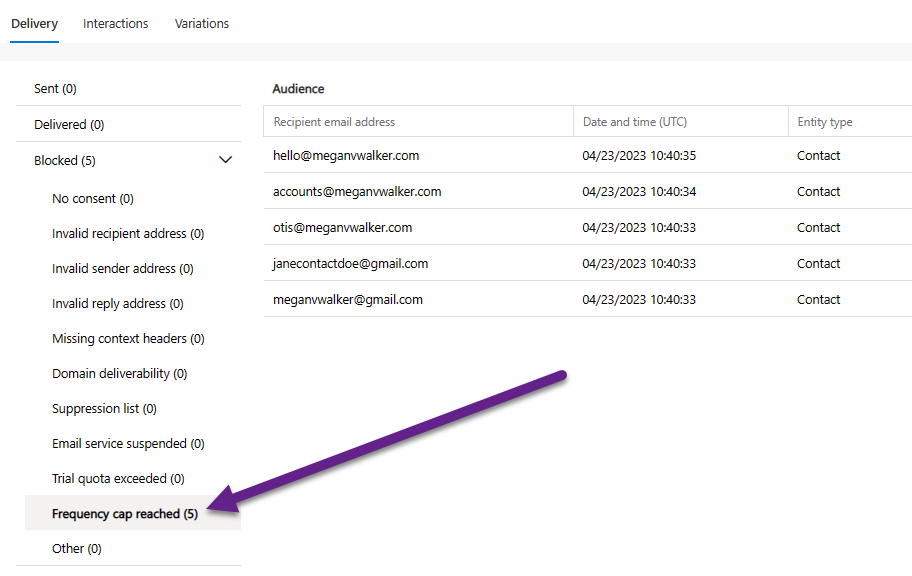
Once your Journey has started and emails are being sent out, you’ll be able to see any Contacts where the emails were blocked due to the frequency cap being met for them.
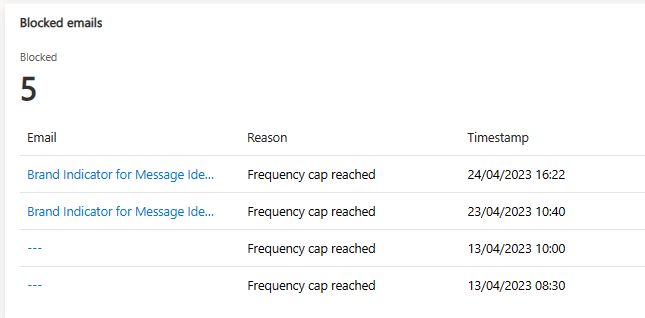
You’ll also see it in the Blocked emails section on the Email Insights for the Contact for Real-time Marketing.




10 responses
Thank you, I have implemented this for a customer. The only question I have and also the customer. What will happen once the cap been reached? Wil they receive the email at a later moment or not at all anymore?
Thanks!
The won’t receive it at all as the Contact will have gone past that stage in the Journey and moved on to the next stage. It is considered an email bounce so the same thing would apply as if their mailbox was full, or there was another hard or soft bounce.
Is it possible to setup a Journey in the way that is waiting until CAP is cleared and the massage goes to the customer, then the journey continues?
Hi Jakub, I am not sure what CAP is cleared means?
Hi Megan,
Is there a smart way to handle emails not been sent out due to frequency cap reached? A contact may miss receiving important information. It would be good if the contact had to wait at that stage in the customer journey until it is OK to send email again. Have you any thoughts?
Hi Robin, there is no way to work around the frequency cap in terms of keeping them in a specific stage in the journey, so you can’t change the behaviour in that way. You could however create a segment to find all people where a specific email was blocked due to frequency capping then use the segment to send out another Journey and try to get the email to them. Something like this using the Email behaviour and picking Email Blocked.

Hi Megan! Great article. I was wondering if you have insight into how the frequency cap is calculated when it comes to duplicate email addresses. If an email address is blocked from a send due to duplication, does that attempt to send still count towards the frequency cap that is set?
Hi Abby, you would see that an email is blocked for only one reason, so if it’s already blocked due to duplication, it couldn’t then be blocked again die to frequency cap if that makes sense!
Hi Megan,
Great article! Do you happen to know whether transactional emails count towards the frequency cap? Let’s say I send out 5 transactional and then 2 commercial emails in one week when the per week cap is 6, will the last commercial email not send? Or are transactional emails fully excluded from the equation?
Hi Christy, transactional emails are not counted and can always get through to the recipient regardless of the frequency cap settings.