
What Happens When You Delete Segment Execution Records

Related:

3 minute read

Information in this article was accurate at the date of publication.

First off, this post is not about saying you SHOULD delete records, but more about information for you as a user of Customer Insights – Journeys, or your environment administrator so you can understand what the records in the msdymkt_segmentexecution table are for. Also what happens if you DID delete them. I stumbled down this road because I had a lovely email from Microsoft saying I was over storage capacity. This table was the highest consumption for data, by a significant amount, so I started digging in. This post explains what it is used for and what happens if you delete the records.

First, this is why I was curious, notice the consumption amount for the records from this table. Yeah, what the heck? Why is it so large? If you want to find the total consumption per table, this link should take you to the newer capacity overview: https://admin.powerplatform.microsoft.com/billing/licenses/Dataverse/environmentview

From there it should prompt you to select an environment. Once selected, you should then be able to see usage per storage type at the top, then you can click on Database, Log or File. The consumption section below will then update based on the storage type you’ve selected.

Click to view in detail

After a bit of searching I came across the known issues documentation from Microsoft with this part on segments specifically. Notice that is even says the table can grow in size which can impact your storage usage and performance. It explains what it is used for, which is the graph and determining when a segment was updated. It also states that it is safe to delete them. Safe yes, but if your admin goes off and deletes everything, they may not be safe if the marketing manager realises!!! 😉

Click to view in detail

Deleting things will impact the chart you see that shows the growth of segment membership.

Click to view in detail

However, one could argue how much historical data you need here, and if you’ve been using the marketing app for any significant amount of time you could have millions (no exaggeration, one client I looked at has nearly 9 million of these records in the table). What I would suggest is a discussion between the marketing manager and a system administrator and determining how far back the history would be needed for the segment growth charts. Then create a bulk delete record that looks something like this.
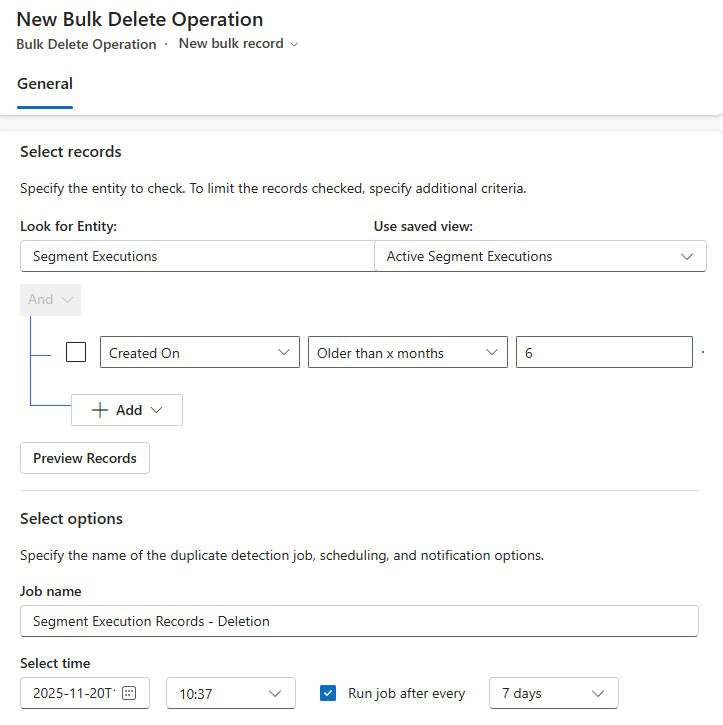
Click to view in detail

I ran it in my system for all of the data and it deleted over 2 million records.

Click to view in detail

But I won’t do that again because this is what I am left with. Doh! I have kept on my delete job that will delete records older than 6 months so I can keep some data but not ALL of the data.

Click to view in detail

Hope this helps!

Megan V. Walker avatar

12 responses

  1. Dan Hesketh avatar
    Dan Hesketh

    Good tip! I’ve been noticing more and more tables affecting database and file storage capacities lately. Including those Email Analytics and other tables associated with Sales Insights etc. Would be great if some of those tables required for first-party features to run would be included / not-counted. Oh well.. 🙂

    1. Megan V. Walker avatar
      Megan V. Walker

      Yes it’s a bit frustrating, and then a hunt to figure out how/why and what to do to ‘turn things off’. I have another post about storage, just trying to figure out what is stored in one specific Analytics table that pushed my file storage through the roof.

  2. Ferdinand von Gaisberg avatar
    Ferdinand von Gaisberg

    Hi Megan,
    we are also in discussion with MS regarding this.
    So just a smal question:
    Where could you visualise consumption in GB?
    BR
    Ferdinand

    1. Megan V. Walker avatar
      Megan V. Walker

      Hi Ferdinand! Hmm, not sure I fully understand the question. GB means Great Britain in my mind… but I am not sure that is what you are meaning.

  3. Ferdinand von Gaisberg avatar
    Ferdinand von Gaisberg

    😉 I was asking for data volume in gigabytes (GB) – the screenshot you provided…
    With my limited knowledge, I have only been able to visualise the number of records stored in this table so far – that’s about 7 million records for me.

    1. Megan V. Walker avatar
      Megan V. Walker

      Ah lol, OK then, not sure why my brain didn’t go to that same place. So the consumption per table would show you the number in GB (NOT Great Britain 🤣). This link should take you to the newer capacity overview: https://admin.powerplatform.microsoft.com/billing/licenses/Dataverse/environmentview/ – it’s a bit of a pain to find!

      From there it should prompt you to select an environment. Once selected, you should then be able to see usage per storage type at the top, then you can click on Database, Log or File. The consumption section below will then update based on the storage type you’ve selected.

  4. Ferdinand von Gaisberg avatar
    Ferdinand von Gaisberg

    Great! Now I got it!
    4,13 GB…

    Thx!

    1. Megan V. Walker avatar
      Megan V. Walker

      Nice! Good. I’ve updated the blog too so it’s clear how you can find it.

  5. Patrick avatar
    Patrick

    Thanks for sharing this and for everything you do, Megan. I just went through this same exercise with one of my clients, so your timing couldn’t be better. I wanted to ask for a bit more clarity on your comment:

    “But I won’t do that again because this is what I am left with. Doh! I have kept on my delete job that will delete records older than 6 months so I can keep some data but not ALL of the data.”

    What is it that you wouldn’t do again?

    1. Megan V. Walker avatar
      Megan V. Walker

      Hi Patrick – this line: I ran it in my system for all of the data and it deleted over 2 million records.

      😉 – I won’t delete it for ALL of my data again.

  6. Lars Petersen avatar
    Lars Petersen

    Hi Megan,

    I started this process 2 days ago, and it has deleted 4,5 million rows at this point. and its still running. A funny thing is that it restarts with a new bulk delete process after 4,5 million, and that is still running.

    We’ve been on RTM since the beginning…..

    1. Megan V. Walker avatar
      Megan V. Walker

      Wow Lars, that’s crazy! It’s ridiculous how many records get created just to show a graph for a segment. Surely considering how all the other insights are stored externally from Dataverse they could have done the same with this right?

Leave a Reply

Your email address will not be published. Required fields are marked *

SUBSCRIBE TO GET CONTENT

Want more articles like this?

Choose the topics that interest you and get new articles delivered directly to your inbox.