
Create Segments From Marketing Lists In Realtime Marketing

Related:

Information in this article was accurate at the date of publication.

Now this one is something I tend NOT to suggest but it is definitely a request that comes up A LOT. How can I create a segment of people I can just add by picking people myself, or based on an upload file. If there isn’t any filtering criteria, you can use the Include Members feature when building your segment, but that has limits of 100 records that can be added in this way. Marketing Lists have been around for well over a decade (anyone know when they were introduced?) and are definitely still used by a LOT of organisations. This post looks at how you can take advantage of a marketing list with way more than 100 members and use it to create a Segment in Realtime marketing.

This assumes you have your marketing list ready to go. Create a new segment in Realtime Marketing for Contacts.
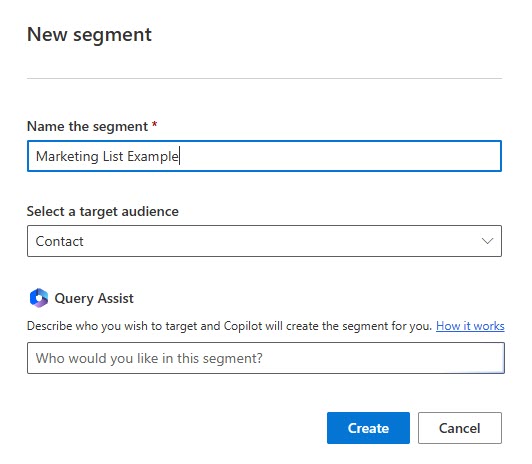
Click to view in detail

Next, if you have never added the related table for marketing lists, you will need to that first.
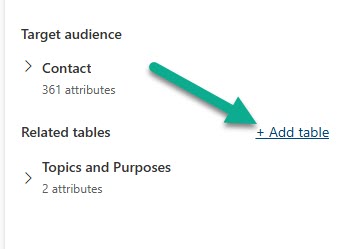
Click to view in detail

Search for marketing list to find the out of the box table. Select it then click next.
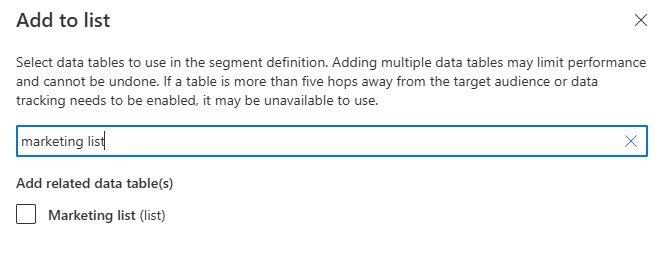
Click to view in detail

Now you can add the table so that you can use it to build your segment.
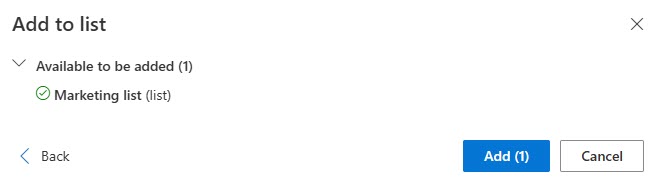
Click to view in detail

Once you have added it, you will see it in the Related Tables section. Search again for Marketing list, and click on the lookup attribute.
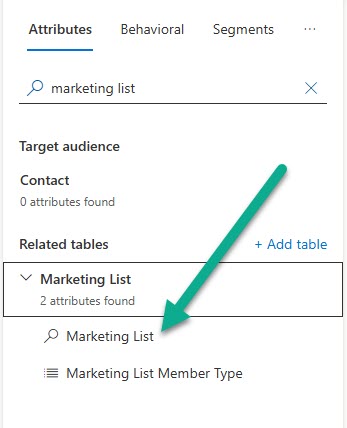
Click to view in detail

Now you will be asked to pick the correct path between a marketing list and a contact. 9 times out of 10 you want the simplest path which is the first one. Pick Marketing List > Contact and click Next.
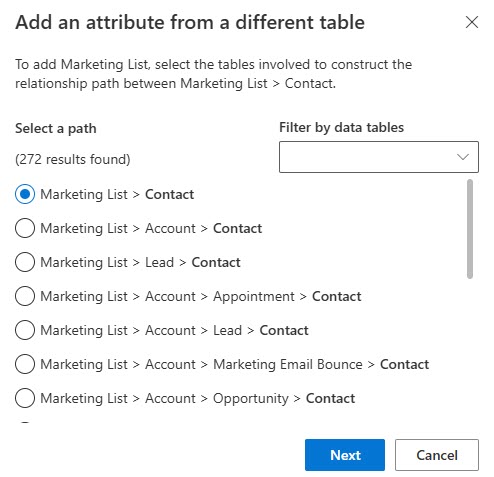
Click to view in detail

Now it wants the related attribute between the two tables. You are in luck as there is only one option available (unless you’ve done some REALLY weird configuration), so select that and click Set path.
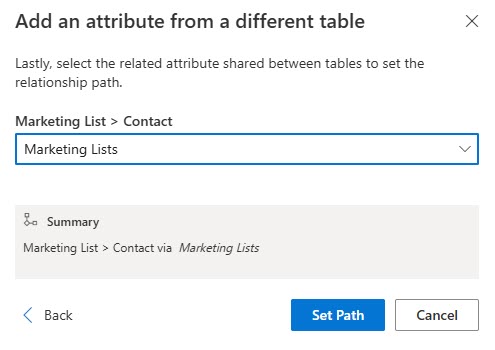
Click to view in detail

Now you get a lovely lookup that you can use to find the right Marketing List. Hooray! You should of course add in any additional filtering criteria you might need to make sure you are getting the correct Contacts (those that are active and have an email address for example).
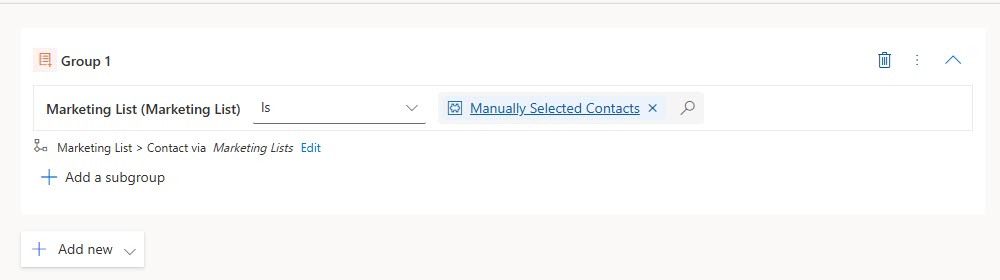
Click to view in detail

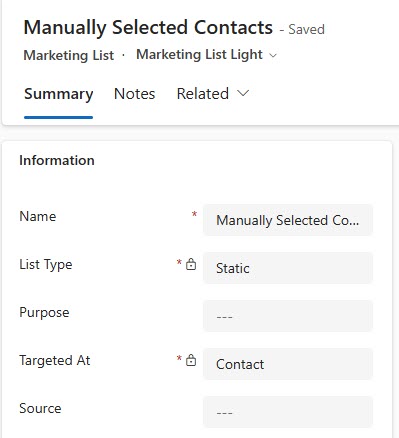
If you’ve not used Marketing Lists before, do some digging before you go off and start creating them. This should NOT be used as a way around good solid filtering in your Segments. I am a big advocate of creating Segments that work dynamically based on accurate data rather than taking a short cut and just dumping people in to a Marketing List. However, Marketing Lists are in the Sales Hub app and have been used for as long as I have been working with CRM/D365 by sales teams and marketing to create lists of people they met at an event etc. Your Marketing List should be targeted at Contacts.
Click to view in detail

And there is an option from a View and directly on a Contact record to add them to a specific Marketing List.

Click to view in detail

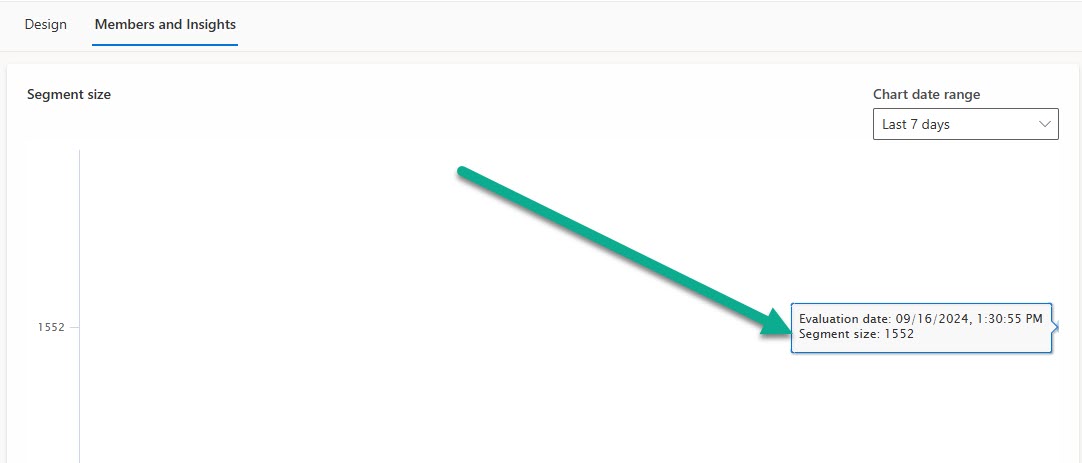
I have 1552 Contacts in my Marketing List, and my Segment shows the exact same number. Quick and easy to do, but again, use with caution and ONLY when necessary. These Segments will never change the number of members unless someone manually adds or removes people from the related Marketing List, so this is something to use only as and when absolutely needed.
Click to view in detail

SUBSCRIBE TO GET CONTENT

Want more articles like this?

Choose the topics that interest you and get new articles delivered directly to your inbox.

20 responses

  1. Krasimira avatar
    Krasimira

    Hello, thank you for this article.
    I was able to find this out by far, however, I have a question as you are mentioning an upload file, but within the Marketing lists section in Dynamics I cannot find such a function and my organisation needs to upload around 4000 members (exceptions, no way to filter out via segment) in a Marketing list in order to use in one special segment and journey. I can see only a template I can create but nothing for uploading data.
    I would appreciate it if you are aware if this is possible?
    Regards,

    1. Megan V. Walker avatar
      Megan V. Walker

      Hi Krasimira, I would talk with your System Administrator. There is standard import functionality that exists in D365 that gives you the ability to use Excel or a CSV file to import and create new records. You would still then need to create a view afterwards of your new records then select them all and add to the Marketing List in bulk.

  2. Stephan Klemm avatar
    Stephan Klemm

    I use Marketing lists very often in Segments, as it this the best workaround for my customers to manually add single Contacts to a Live Journey.

    Not being able to edit Real-time Segments used in Live Journeys is one of the worst restrictions so far. Adding the Marketing Lists to the Real-time navigation bar is now one of the first steps in a new Marketing setup.

    1. Megan V. Walker avatar
      Megan V. Walker

      Yup. It shouldn’t be needed but Marketing Lists will be a thing we keep using for a LONG TIME in the Marketing world.

  3. Josh avatar
    Josh

    Hi from Germany,

    I have a question about the marketing lists, will they still be available in Customer Insights Journey after the end of outbound marketing (in my region June 2025)?

    Many thanks and regards
    Josh

    1. Megan V. Walker avatar
      Megan V. Walker

      Hi Josh, from what I understand, there is no difference between regions and the end of Outbound marketing, it’s June 2025 for all. In terms of Marketing Lists, this table is a much older one, from original CRM days. I haven’t seen anything about it being deprecated. You may want to add access to it from the navigation in Real-time so you can get to it easily, but it should still be there in Dataverse.

  4. Helen avatar
    Helen

    Hi Megan

    I get an error ”
    Entity ‘listmember’ cannot be used in query. Entity has no items.” following the steps above’. It might be a permission-issue. But I have looked for entity ‘listmember’ but cannot find it.
    Do you know whats missing or which Securityroles do you have?

    1. Megan V. Walker avatar
      Megan V. Walker

      Hi Helen, at what point do you get an error? Is it when adding the Marketing list table, or some other point?

    2. Wiebke Ursula Beckers avatar
      Wiebke Ursula Beckers

      I’ve got the same issue by adding the marketing lists like it is explained above. Then I want to calculate my segment members but than the error is shown up.

    3. Megan V. Walker avatar
      Megan V. Walker

      Hi Wiebke, there was a bug which should now be resolved. Check you are on the latest version?

  5. Carsten avatar
    Carsten

    Hi Megan, hi @ll,

    I totally agree that filtering ist the best way to build segments dynamically. But, as you’ve already mentioned people are just working as the used to and so they set up marketing lists for nearly every mail we want to send out. 🙁

    I’ve seen something really strange this morning: We have a marketing list set up and using this one in a segment to send out a mail via Customer Insights. This marketing list was updated shortly (around 30 minutes) before the mail was sent out. Unfortunately the segment wasn’t refreshed at send out time and has used the old number of members to send to. What a crap!

    Has anyone else seen this behaviour? I’m so frustrated of Customer Insights sometines. If this functionality is avaible the send out process should update the segment with the current members of the marketing list, shouldn’t it?

    Cheers
    Carsten

    1. Megan V. Walker avatar
      Megan V. Walker

      Hi Carsten, this will likely be of use. https://learn.microsoft.com/en-us/dynamics365/customer-insights/journeys/auto-segment-management – there are specific timeframes for segments being refreshed. Sounds like your timings were unfortunately just a little off and therefore missed your marketing list update. It is crap, but it’s definitely not unknown and is documented.

  6. Jesper avatar
    Jesper

    Hi Megan,
    thanks for a good article.
    I have helped our Sales team to create a Segment based on 4 Marketinglists, which works fine for mail send out.
    However, when I want to see the “full list” of people from all 4 marketinglist in the segment, I only see their Full Name and Email (Segment -> Members and Insights.)
    Q: Is there a way to create a better view of all contacts in the segment, where I can see First/Last Name, Company, Title, Email, phone. ?

  7. Tim avatar
    Tim

    Hi Meghan,

    I found this article. However I was not able to selected the marketing list under related tables, it is not available for me to select.

    BR
    Tim

    1. Megan V. Walker avatar
      Megan V. Walker

      Hi Tim…. does it give you any kind of error when trying to select it?

    2. Tim avatar
      Tim

      hey, for me the table is just not there to select. it is not visible in the UI

    3. Megan V. Walker avatar
      Megan V. Walker

      Hi Tim, sorry for the delay. Apparently it was a bug introduced a few weeks ago, with the resolution for it rolling out as we speak. So try again soon and it should be there!

  8. Jan avatar
    Jan

    Hi Megan,
    I have the same issue like others that I cannot add the Marketing Lists anymore to real-time segments. I’ve just done this a couple of weeks before for a customer but it seems there is an issue now (or deprecated?)

    You asked for an error. Here it is:

    Unavailable to be added (1)
    The following tables cannot be added because:
    a. the table may be more than five hops away from the target audience
    b. one or more tables in the path leading to “Marketing List” might be missing from the “Related tables” section. Ensure required tables are added to the “Related tables” section.
    Marketing List (list)

    This pops up already when selecting the Marketing List via “add table” in the related tables section. I verified this in a couple of different RTM environment and even in a fairly new test environment. There must be a general issue or – my guess – Microsoft decided to cut that option.

    Regards

    1. Megan V. Walker avatar
      Megan V. Walker

      Hi Jan, sorry for the delay. Apparently it was a bug introduced a few weeks ago, with the resolution for it rolling out as we speak. So try again soon and it should be there!

Leave a Reply

Your email address will not be published. Required fields are marked *