This post has come out of a need I’ve had myself when sending out the D365 Marketing Weekly newsletter to subscribers. Someone fills out the form to opt in and the first name and last name a required (always the best option for your forms!) so I know the data is in there. What I can’t control is if they typed upper case, lower case or a mixture of the two. What I can control is setting the first name and last name value in a nicely formatted way using a capital letter on the first name and lower for the rest. This post shows how you can format recipient names then use the new fields in your emails.
First thing, we need two new fields. One thing to keep in mind, if you want something more complex you would need to use Power Automate, or if you want to update the actual first name and last name fields again, Power Automate is the way to go. This approach leaves the default values alone and just gives marketing a formatted version of each. The fields should be the Formula data type.
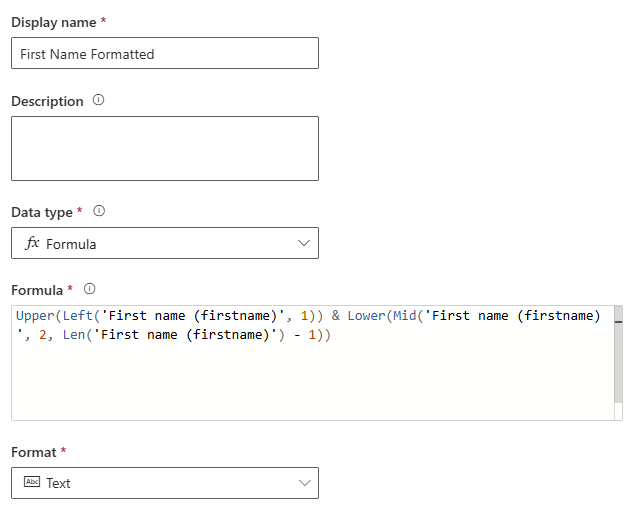
This formula for the first name field will set the first character as a capital letter and the rest as lower case.
Upper(Left('First name (firstname)', 1)) & Lower(Mid('First name (firstname)', 2, Len('First name (firstname)') - 1))
This formula for the last name field will set the first character as a capital letter and the rest as lower case.
Upper(Left('Last name (lastname)', 1)) & Lower(Mid('Last name (lastname)', 2, Len('Last name (lastname)') - 1))
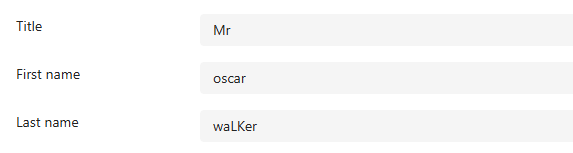
Here we can see the standard first and last name fields where someone has typed with random cases used.
Our two new formula fields will show these with correct capitalisation.
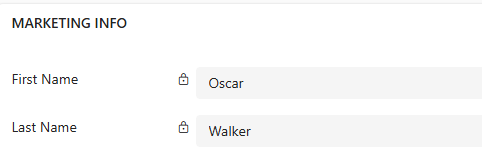
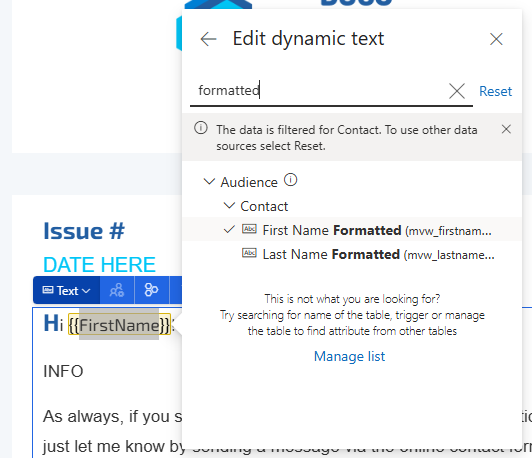
Now on emails, I can use the new First Name Formatted field instead of the standard First Name field. Quite simple, but can make a difference when addressing someone in an email.






Leave a Reply