
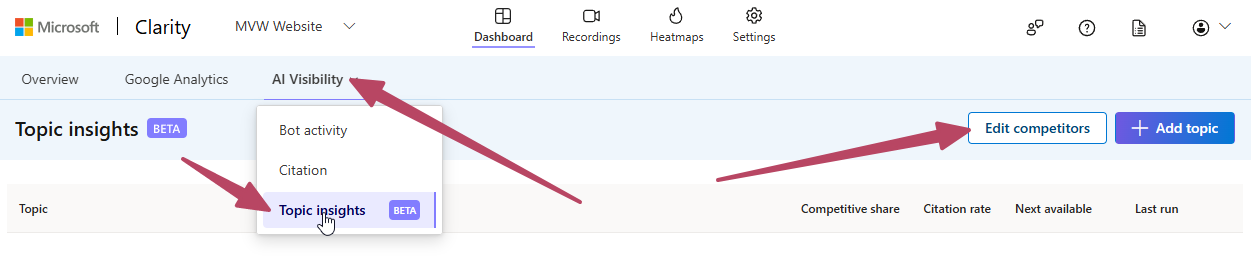
Understanding how people find your website is useful, but what happens when they get an answer from an AI assistant without ever visiting it? Is your content being cited, and which other websites are contributing to those answers? Microsoft Clarity has a feature in beta called Topic insights, available under AI Visibility. You can use it to explore how your website appears in AI responses to a set of questions, compare it with other domains, and identify potential content opportunities.
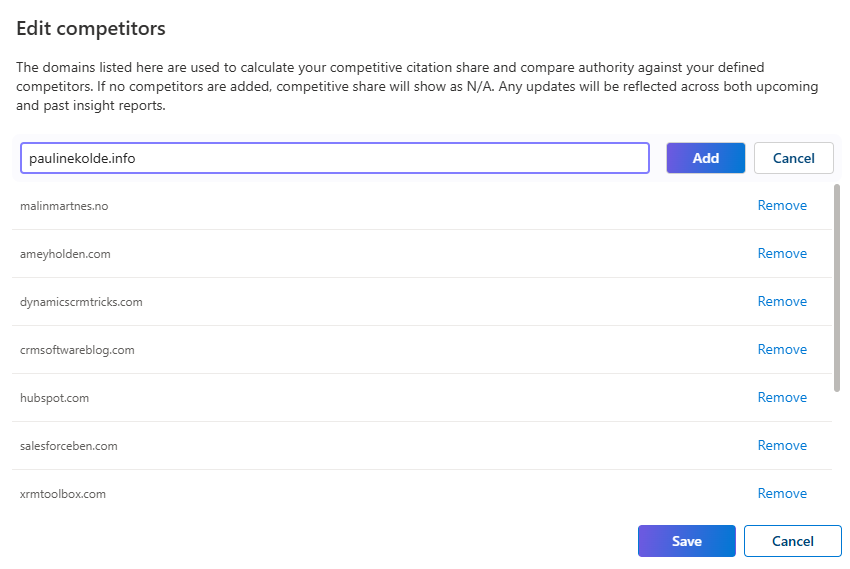
Set up your competitors and topic
Before creating a topic, you can select Edit competitors to add the domains you want to compare your website against. For my blog, that includes other websites covering similar products and subjects. The explanation in this window is worth reading: these domains are used to calculate competitive citation share and compare authority against your defined competitors. Without any competitors, competitive share will show as N/A. Changes also apply to both past and upcoming insight reports.
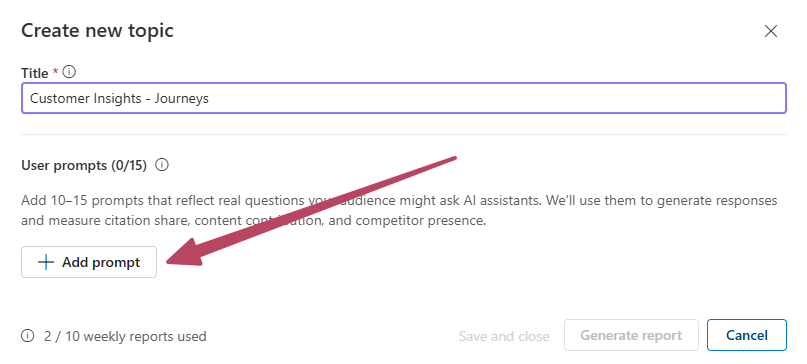
Next, select Add topic. Give the topic a title, then add questions that your audience might ask an AI assistant. The form asks for 10–15 prompts. Rather than entering a few broad keywords, think about the practical problems your readers are trying to solve. For this example, I focused on forms, consent, and automation in Customer Insights – Journeys.
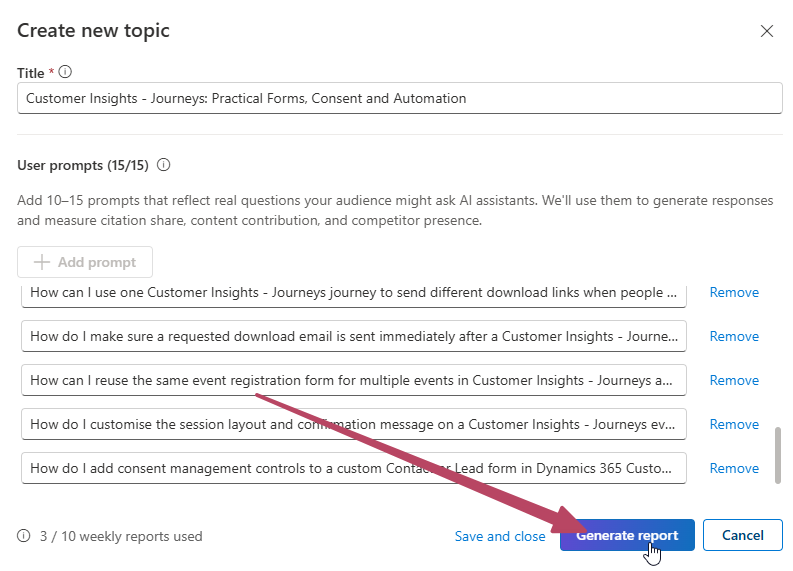
Some of my questions covered reusing event registration forms, sending different download links from the same journey, and managing consent on Contact and Lead records. Grouping related questions gave the topic a clearer focus, reflected in the title: “Customer Insights – Journeys: Practical Forms, Consent and Automation”. Once the prompts are ready, select Generate report. There is also a Save and close option. My account displayed an allowance of 10 weekly reports, along with how many I had already used.
Generating the insight takes some time. Clarity displays a progress screen and lets you know you can come back later.
Understand the citation metrics
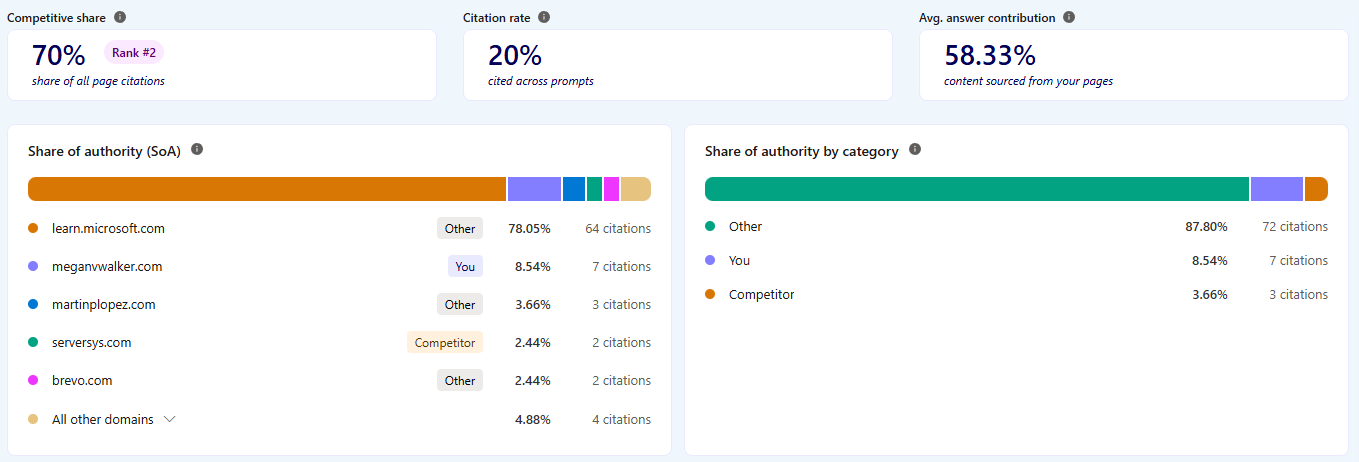
When the report is ready, there are several measures to explore. In this example, my website had a competitive share of 70%, a citation rate of 20%, and an average answer contribution of 58.33%. These figures need to be read alongside their labels. Competitive share uses the competitor comparison you have configured. Citation rate is labelled “cited across prompts”, while average answer contribution is labelled “content sourced from your pages”.
The Share of authority section provides a broader view of the domains cited in the report. Here, learn.microsoft.com accounted for 64 citations, while my website had seven, representing 8.54% of the total. That is a useful distinction: the 70% competitive share figure does not mean my website received 70% of all citations across every source. The category breakdown also separates your website, configured competitors, and other domains.
Explore content opportunities and contributing pages
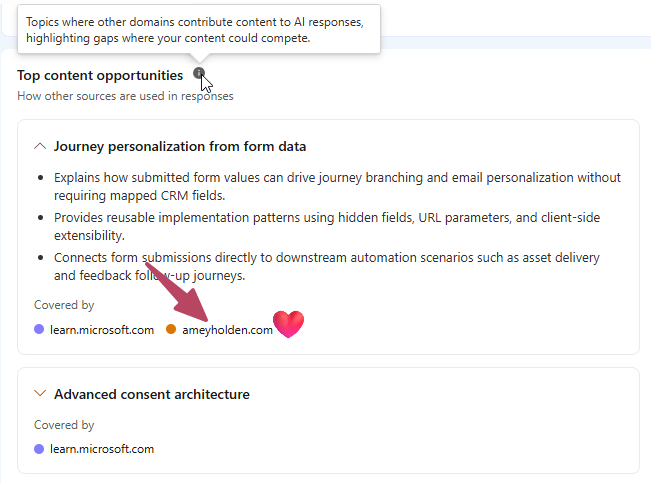
Beyond the numbers, Top content opportunities highlights subjects where other domains contribute to AI responses. In my report, one example was journey personalisation from form data, with learn.microsoft.com and ameyholden.com listed as sources.
The descriptions give you something more useful than a broad topic name. They identify specific angles, such as using submitted form values for journey branching or connecting submissions to follow-up automation. I’d use these as ideas to investigate: perhaps there is a subject I haven’t covered, or an existing post could explain a particular scenario more clearly.
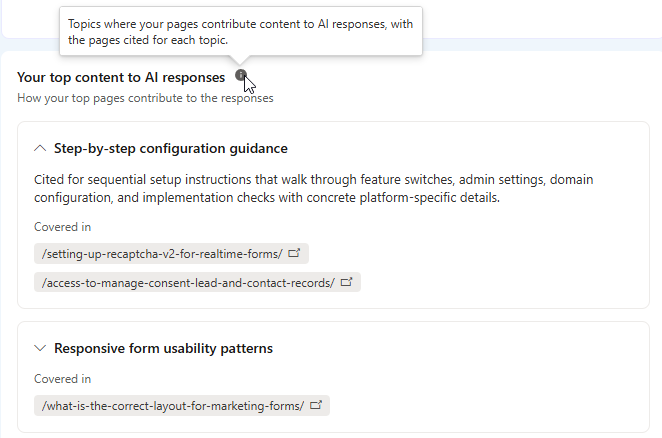
You can also explore Your top content to AI responses. This groups the subjects your pages contribute to and links to the relevant content. For my website, that included step-by-step configuration guidance, with posts about reCAPTCHA and consent access, plus responsive form usability patterns. This makes it easier to connect the report’s findings with individual blog posts.
Review the questions behind the results
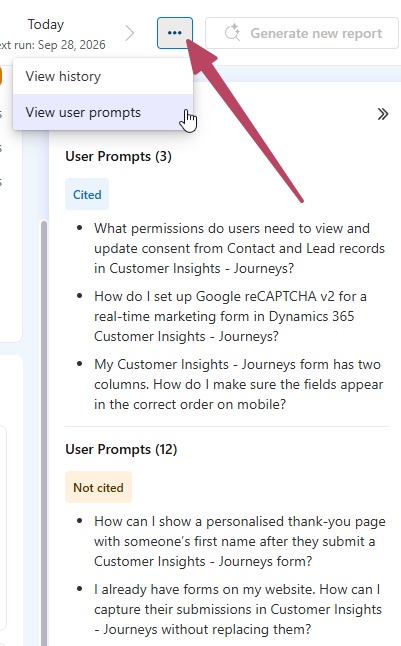
Finally, the three-dot menu includes View history and View user prompts. The prompt view separates questions where your website was cited from those where it wasn’t. My report showed three cited prompts and 12 not cited. That makes the results much more actionable. I can review the actual questions and consider whether I already have suitable content, whether it needs updating, or whether there is a useful new post to write.
For me, the most interesting part of Topic insights is the connection between questions, sources, and individual pages. I can see where my content is contributing to answers and use the gaps as a starting point for further investigation. I’ll be interested to see how those results change as I update existing posts and publish new ones. It’s worth keeping in mind that Topic insights is still in beta, so the interface, reporting limits, and results may change as Microsoft develops the feature. I’d treat the findings as a useful starting point for exploring how your content appears in AI responses, rather than a definitive measure of your website’s overall AI visibility.



Leave a Reply